← Back to selected work

The Villages / Homefinder

Modernizing home search across web and mobile.

I helped redesign and build Homefinder—an Angular micro-frontend that brings property discovery, filters, geographic context, and home details into one responsive experience across web and mobile applications.

RoleProduct design + Angular implementation
Team4 design engineers + 2 software engineers
DeliveryResponsive web + embedded mobile
Homefinder desktop experience with listing filters, home results, and an interactive map
Homefinder mobile experience showing responsive search and listing cards
The live Homefinder experience across desktop and a true 360px mobile viewport. No internal data or unreleased application designs are shown.

01 / Context

A high-intent search experience inside a much larger ecosystem.

Homefinder is where prospective residents move from exploring The Villages lifestyle to comparing real homes. The experience brings new homes, pre-owned homes, and homesites into one searchable list-and-map workspace.

A legacy version had already established familiar behaviors, but the product also carried ambiguous data points and cross-platform constraints. The work required improving clarity without disrupting the way returning users searched.

02 / Product challenge

Make complexity useful before making it invisible.

Data

One understandable property model

Consolidate ambiguous and overlapping listing attributes into filters people could confidently use.

Continuity

A respectful evolution of a legacy tool

Improve hierarchy and interaction patterns while preserving the mental model returning users already knew.

Delivery

One product across several hosts

Build a responsive experience that works independently on the web and as an embedded mobile surface.

03 / Interaction model

Move naturally from discovery to a confident decision.

The strongest part of the experience is not a single screen. It is the way browsing, narrowing, and evaluating a home stay connected as one journey.

01 / Explore

Scan homes without losing location context.

The split list-and-map canvas supports quick visual comparison while category toggles keep new homes, pre-owned homes, and homesites in one search.

Homefinder desktop interface with listing results beside an interactive property map
02 / Refine

Turn complex inventory into understandable choices.

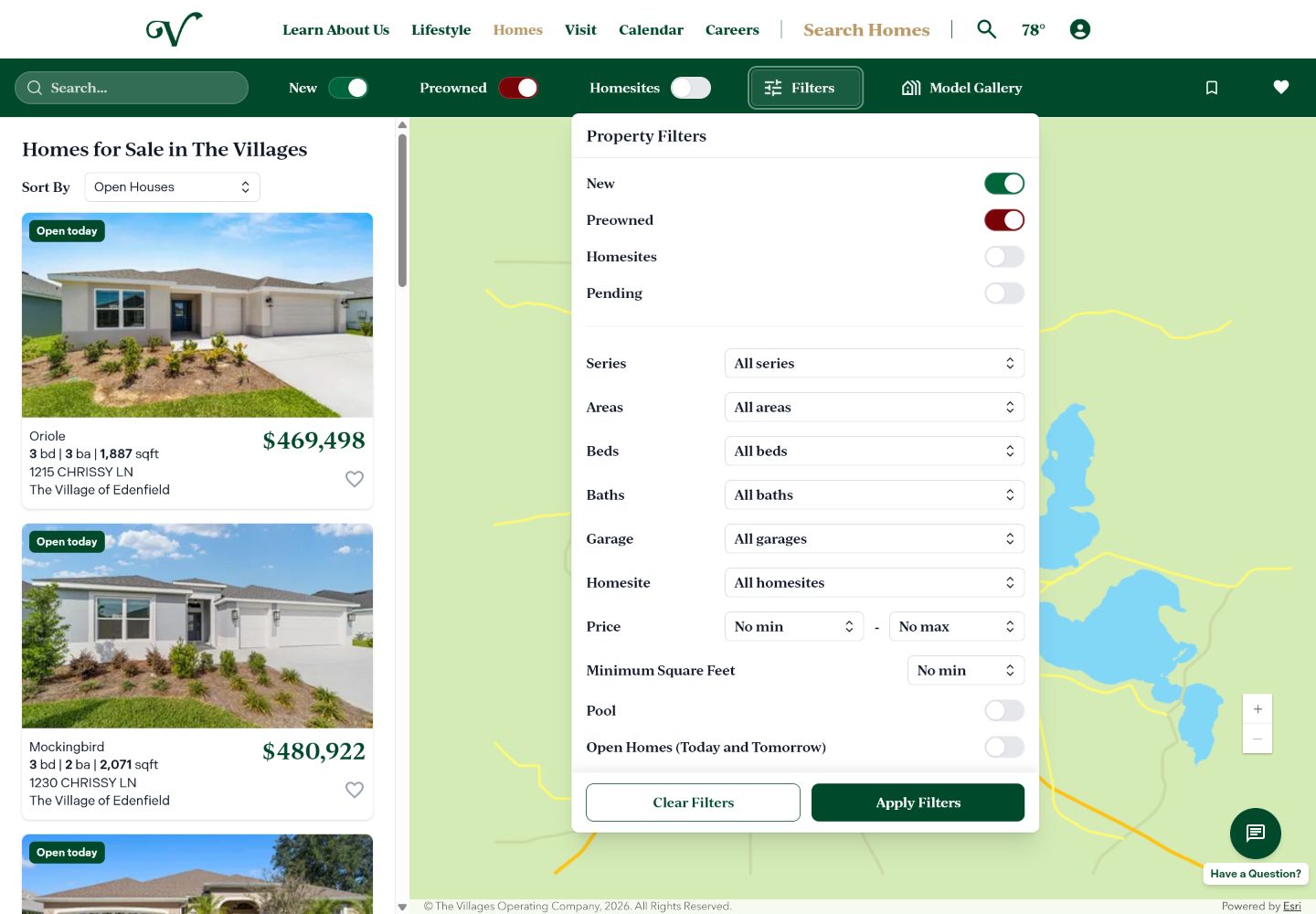
A focused filter layer brings series, areas, bedrooms, bathrooms, garage, homesite, price, square footage, pool, and open-home criteria together without permanently crowding the map.

Homefinder property filters layered over the map and listing interface
03 / Decide

Bring the evidence and next actions into one place.

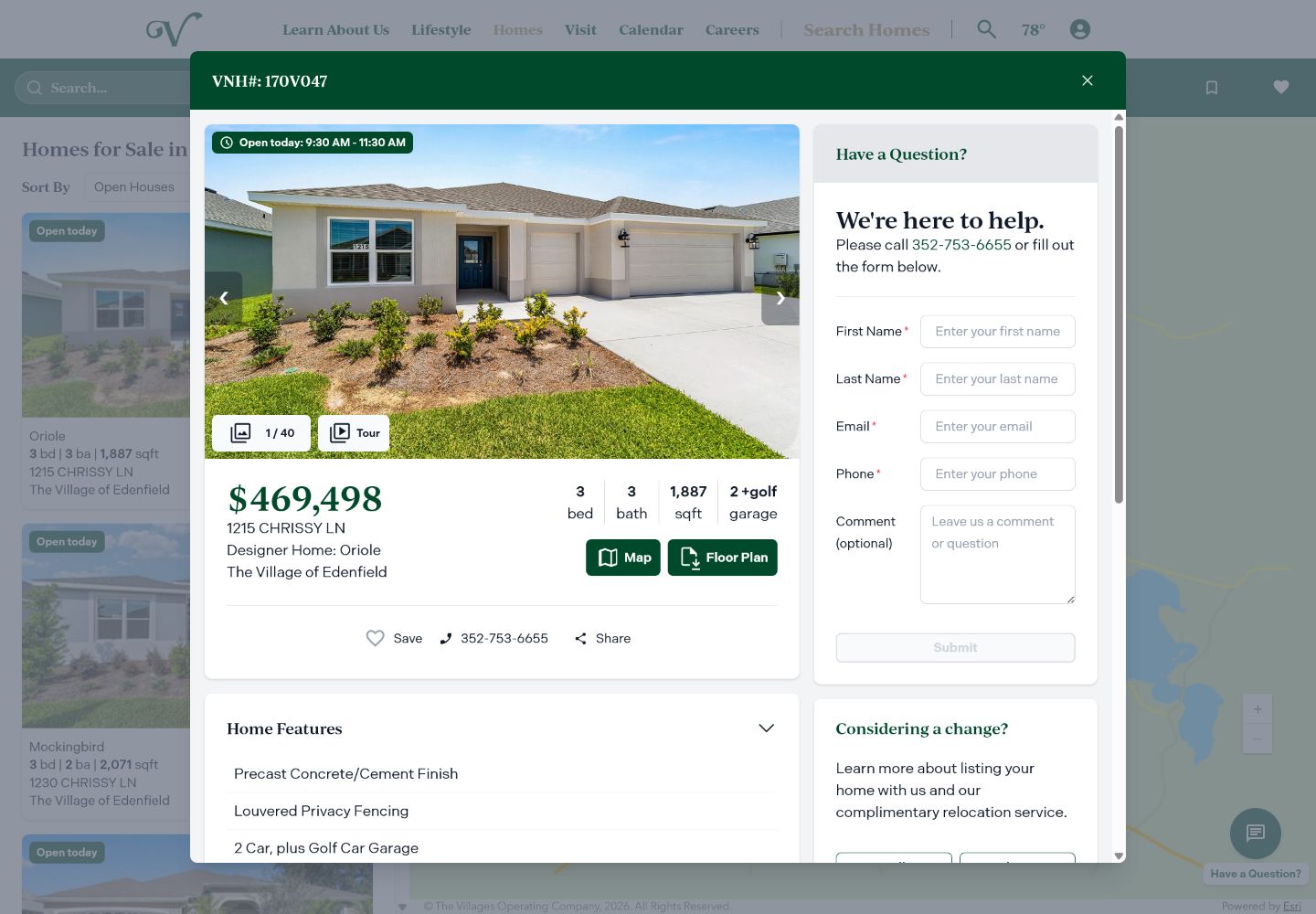
The home-detail layer combines the gallery, tour, price, specifications, map, floor plan, save, share, features, and contact paths while preserving the search behind it.

Homefinder detail layer with property gallery, specifications, floor plan, save, share, and contact actions

04 / Detail experience

Design the moments between interest and action.

Opening a listing creates a focused decision environment. Photography, property context, practical actions, and a path to a real person stay connected without forcing someone to abandon their search.

Homefinder full-screen property gallery with photo, tour, and map modes plus previous and next image controls
The live gallery supports Photos, Tour, and Map modes, desktop arrow controls, and horizontal swipe navigation on touch screens.
Visual evaluation

Make the home the focus.

The lightbox removes surrounding search noise and lets people move through a deep photo set. On a 360px viewport, a horizontal swipe advances the gallery without relying on small arrow targets.

Action hierarchy

Keep high-value actions within reach.

Map and Floor Plan receive primary emphasis, while Save, call, and Share form a compact secondary row that stays easy to scan on mobile.

Progressive disclosure

Reveal depth without front-loading it.

Home Features, the home series, and community context live in accordions with smooth height transitions, adding detail without overwhelming the first read.

Guided conversion

Connect interest to a human next step.

The desktop detail layer keeps a sales-help form beside the home, while phone, Sell, and Relocate paths support an agent-assisted transition from consideration to conversation.

Live interaction capture

See the detail experience move.

Recorded from the public product at a true mobile viewport, this loop follows the journey from property details into the immersive gallery, through a horizontal image change, and back into the expandable home information.

Mobile Homefinder interaction showing a property gallery, image navigation, and expandable home features
Real mobile behavior: open the gallery, move between photos, and reveal additional property details.

05 / Platform strategy

A shared product, not three look-alike interfaces.

Homefinder was implemented as an Angular micro-frontend so the product could keep one interface foundation while being consumed by different web and mobile environments.

Structured inputProperty data

Listings, categories, attributes, status, pricing, and location.

Shared product layerAngular Homefinder micro-frontend

Filters, cards, map, saved homes, responsive behavior, and iconography.

LivePublic website
Embedded todayLegacy mobile app
Integration in progressNext-generation app

06 / Design decisions

Make a dense search tool feel direct and approachable.

01

Turn ambiguous data into useful choices

I helped consolidate overlapping property data into a filter structure people could understand without knowing the organization behind the data.

02

Keep browsing and geography connected

The listing rail and map work as one canvas, helping people compare home details without losing the location context behind each option.

03

Let people inspect a home without losing their search

The detail layer keeps the search visible behind it while bringing photography, specifications, floor plans, saving, sharing, and contact actions together.

04

Adapt the hierarchy instead of shrinking it

On mobile, search, filters, saved homes, map access, listing cards, and home details are reorganized around touch and one-handed scanning.

05

Protect the design through implementation

Working directly in Angular let me resolve responsive and component-level decisions with the engineers instead of losing them between design and production.

07 / Responsive experience

Preserve the journey while changing the hierarchy.

Mobile is a purpose-built version of the same product logic—not a scaled-down desktop screen. These complete 360px states show how the experience moves from browsing to refinement and detailed evaluation.

Mobile Homefinder browse state with search controls and full listing cards
BrowseSearch and compare complete listing cards.
Mobile Homefinder filters with property criteria and persistent actions
RefineFocus on criteria without competing content.
Mobile Homefinder property detail with gallery, facts, actions, and features
InspectEvaluate a home and act from one clear view.

08 / Contribution

Design decisions grounded in stakeholder needs and production code.

I worked directly with stakeholders to clarify requirements, resolve ambiguity in the available data, and make product decisions alongside four design engineers and two software engineers.

My contribution extended through the frontend: I designed interface patterns and iconography, implemented substantial parts of the Angular experience, and collaborated through responsive behavior and production delivery.

The current Homefinder is live on the public website and embedded in the legacy application. Integration into the redesigned application is still in progress, so no unreleased screens or unfinished outcomes are presented here.

View live Homefinder

Selected work

Return to the full portfolio.

View selected work